
Let's be honest about SAM.gov.
It's the single most valuable database in the world. It holds billions of dollars in potential revenue. It is the undisputed "source of truth" for federal business.
It is also a graveyard for good intentions.
If you're a Capture Manager or a small business CEO, you know the drill. You run a search for SAM.gov contract opportunities. You filter by your NAICS code. You get 50 results. You feel hopeful.
Then you click one.
Suddenly, you're staring at a wall of 15 different attachments.
- Solicitation_Final_v3.pdf
- Attachment_J1_PWS.docx
- Attachment_J2_Pricing_Matrix.xlsx
- Amendment_0001.pdf
At this moment, you face a critical choice.
Choice A: Download them all. Spend 45 minutes reading legal jargon. Realize too late that you are disqualified because of a Facility Clearance requirement buried on page 92.
Choice B: Use the "Shred Method."
Here's how to stop reading SAM.gov the hard way and start spotting winning opportunities in seconds.
The Secret: The Government Writes for Lawyers. You Must Read Like a Hacker.
The biggest mistake contractors make is reading a solicitation like a book: from start to finish.
The government doesn't write solicitations for clarity. They write them for defensibility. They bury the "Killer" requirements deep inside the file stack to ensure only the most patient and meticulous bidders survive.
When you look at a SAM.gov contract, the intelligence you need is fragmented:
- Section C (Scope): Tells you what the work is.
- Section L (Instructions): Tells you the price of admission.
- Section M (Evaluation): Tells you if you can actually win.
Most people start at Section A. By the time they hit Section M, their eyes have glazed over, and they've missed the glaring "No-Bid" signal hiding in plain sight.
The 3-Step "Shred" Method (The Manual Hack)
If you must do this manually, be surgical. Ignore the "Narrative." Hunt for the "Gates."
Step 1: The "Killer" Check (Start with Section M)
Scroll immediately to Section M (Evaluation Factors). This is your "No" button.
Scan for the Pass/Fail criteria.
- Is an ISO 27001 certification mandatory at time of proposal?
- Is a Top Secret Facility Clearance (FCL) required right now?
If you see a "Killer" you can't meet, close the tab. You just saved yourself 45 minutes of wasted hope.
Step 2: The "Burden" Check (Move to Section L)
If you survived Section M, go to Section L (Instructions). This is the "Price Tag."
- Volume Count: Are they asking for 5 separate volumes?
- Page Count: Is the Technical Volume 100 pages?
- Key Personnel: Do they demand 7 resumes with signed Letters of Commitment?
This is pure math. If the contract profit is $20k but the "Burden" is 100 hours of writing, the ROI is negative. Walk away.
Step 3: The "Scope" Check (Finally, Section C)
Only now, after passing the first two gates, do you read the Performance Work Statement (PWS). Scan for "Mismatch Keywords."
- If you are an IT shop, look for "Warehousing," "Logistics," or "Construction."
- If you see them, you are in the wrong lane.
The "Magic Button": The SAM.gov Overlay
The manual method works. It is disciplined. It is smart.
But it is slow.
And when SAM.gov drops 20 new opportunities in your inbox at 6:00 AM, you don't have time for slow. "Slow" means you are still reading the first RFP while your competitor has already assembled their dream team.
That is why we built askaGOAT.
We asked: "What if you could run the Shred Method instantly, without opening a single document?"
Think of askaGOAT as the "Analyze Button" that SAM.gov forgot to build.
How It Works
Instead of downloading 15 attachments to your desktop:
- Grab the files from the SAM.gov opportunity.
- Upload to askaGOAT.
- Get the "Hoofnote."
The Hoofnote is a 1-page intelligence brief that executes the "Shred" automatically.
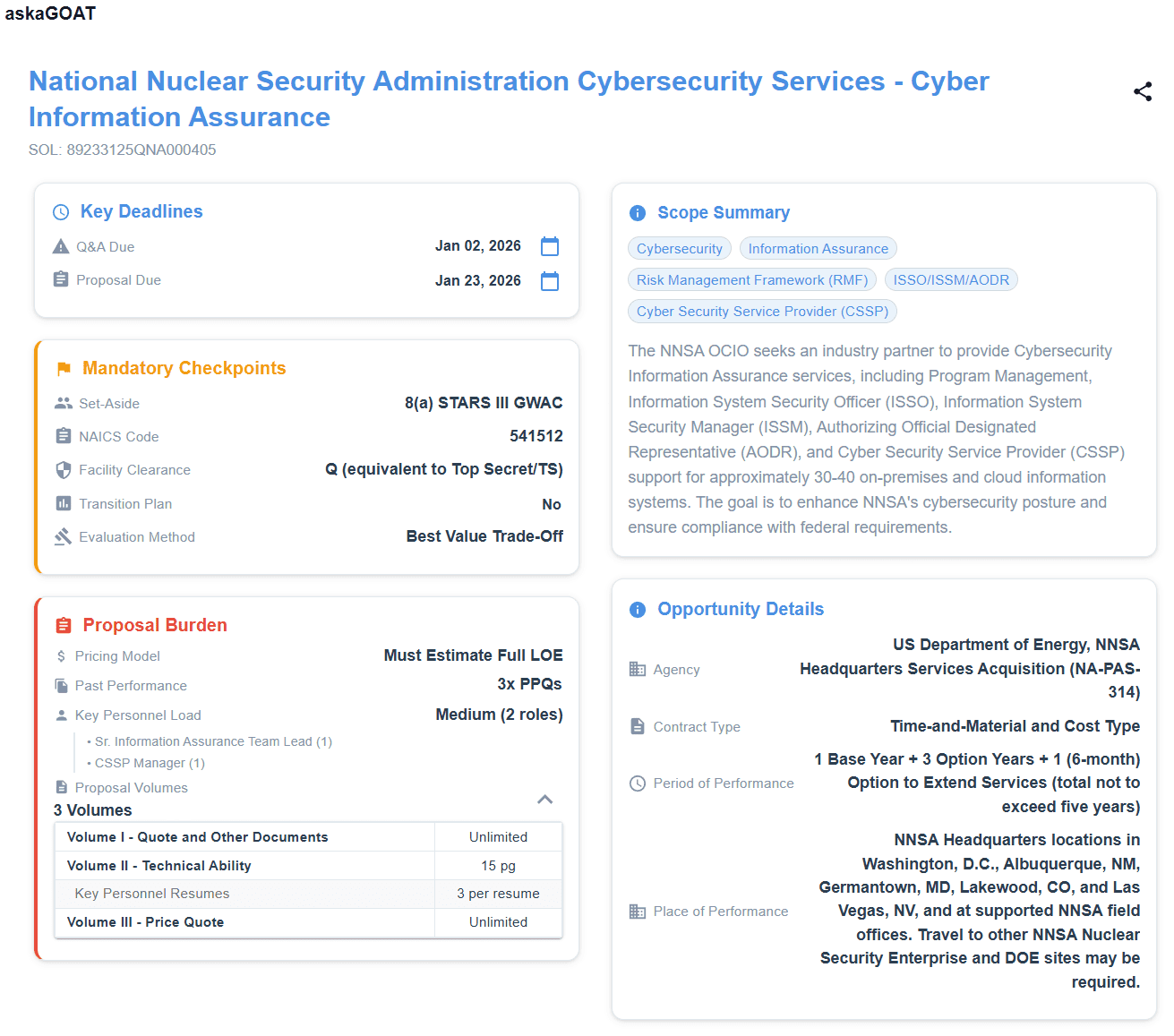
- It flags the "Killers" (FCL, Certs) in bright red.
- It counts the "Burden" (Pages, Volumes, Resumes) for you.
- It summarizes the "Scope" so you can decide in seconds.
Stop Reading. Start Deciding.
The goal of SAM.gov isn't to read documents. The goal is to find revenue.
You don't need to be a faster reader. You need a sharper filter.
Next time you are drowning in a sea of federal contract opportunities, don't reach for the coffee. Reach for the shredder.
Turn SAM.gov into a Decision Engine.
Stop downloading zip files. Upload your next solicitation to askaGOAT and get the analysis in 60 seconds.
Start Your Free TrialNo credit card necessary.